
What Is an AI Customer Engagement Platform for Retail?
Learn how AI customer engagement platforms help retailers guide product discovery, compare options, capture leads and support shoppers across channels.
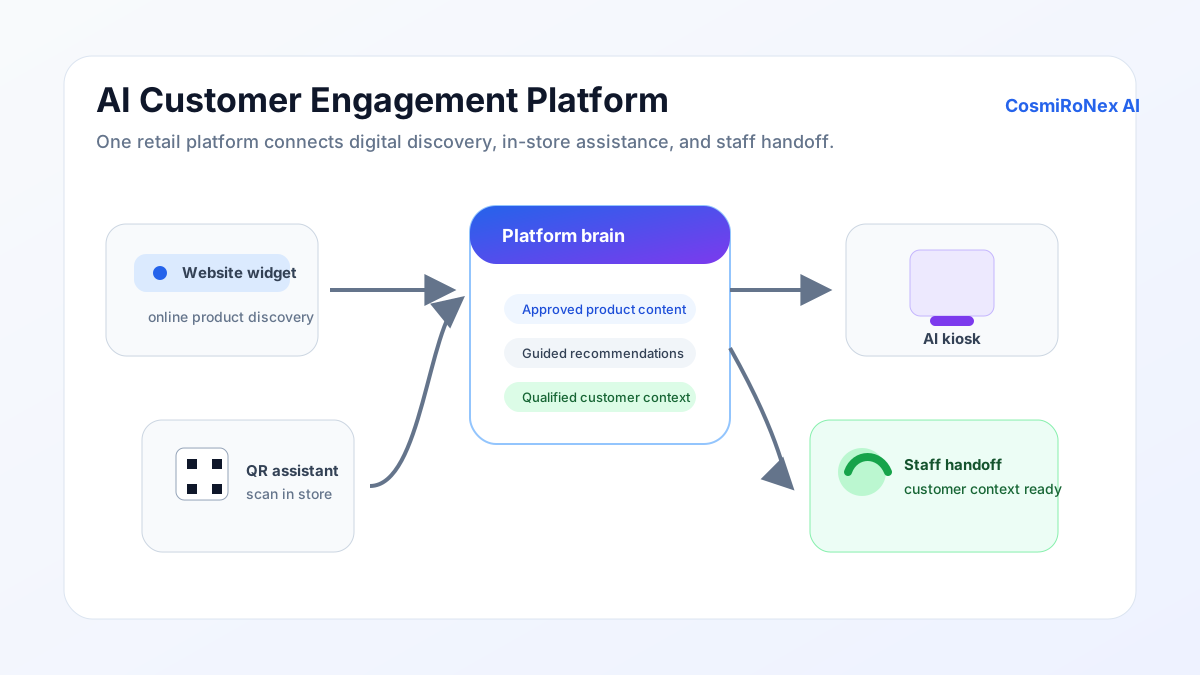
What it is — a direct answer
An AI customer engagement platform for retail is software that answers customer questions, guides product discovery, handles comparisons, and captures enquiries — using a knowledge base built from the store's own product and policy information. It runs on the store's website, on in-store QR codes, or on a touchscreen kiosk, depending on where customers need assistance.
The core idea is simple: customers ask questions in plain language, and the platform returns answers drawn from the content the store has uploaded and approved. The platform does not invent answers; it works from the information it has been given.
Customer engagement in retail
Engagement in a retail context means the moments when a customer actively interacts with information about a product — asking a question, comparing two options, checking a return policy, or deciding whether a particular model suits their requirements. These moments happen throughout a purchase journey, often before the customer has spoken to anyone on the shop floor.
In a busy showroom or on a large e-commerce catalogue, customers frequently find it difficult to locate specific answers. Staff may be occupied with other customers. A website may have hundreds of product pages but no guided way for a visitor to narrow their options. The result is that a proportion of interested customers leave without the information they needed.
An AI engagement platform addresses this gap — not by trying to simulate a salesperson, but by making the store's existing knowledge accessible to customers immediately, in whatever language they prefer.
How it differs from a basic chatbot
A basic scripted chatbot follows a decision tree: the customer picks from a set of options at each step, and the chatbot routes them to a pre-written response. This works for simple, predictable enquiries — opening hours, contact details — but falls short when a customer asks a nuanced product question, wants to compare two items, or enquires about a policy that was updated last month.
A document-grounded retail assistant is different. The store uploads product information, catalogues, warranty documents, and policy pages. The AI reads and indexes this content, then uses it to answer free-form questions in natural language. When the store updates a product sheet, the assistant reflects the change after the document is re-uploaded and approved. The answers are only as accurate as the uploaded content — which is why reviewing and maintaining that content is part of running the platform.
The three deployment surfaces
CosmiRoNex AI offers three ways to put this assistant in front of customers, each suited to a different touchpoint.
Website AI Widget
A chat panel embedded in the store's website. Visitors can ask product questions, compare options, and request a callback or send an enquiry, without leaving the page they are on. It is the most practical starting point for businesses with an online presence.
QR Assistant
A QR code placed on a showroom floor, product tag, brochure, or signage. When a customer scans it with a smartphone, a branded AI assistant opens in the browser — no application download required. The customer can ask questions about the product next to them, compare it with another model, and submit their contact details if they want a follow-up.
AI Kiosk Experience
A touchscreen display running the AI assistant in a kiosk mode. It suits walk-in retail environments where a dedicated digital point of assistance makes sense — near the store entrance, in a waiting area, or beside a product range. The kiosk runs the same underlying AI assistant as the website widget and QR experience; it is the presentation surface that differs.
Core capabilities
Product discovery
A customer describes what they are looking for — "a dining table that seats six and fits in a room about four metres wide" — and the assistant uses the uploaded catalogue to suggest matching options. This guided approach helps customers who arrive with a need but no specific product in mind.
Product comparison
When a customer narrows their shortlist to two or three items, the assistant can compare them across the dimensions recorded in the product content — features, dimensions, warranty terms, or pricing shown in the catalogue. The comparison is drawn from what the store has uploaded; it reflects the information available, not live inventory data.
Policy and warranty questions
Customers often have questions about return windows, warranty coverage, delivery timelines, and financing options. If these are documented in uploaded policy pages, the assistant can answer them directly. For policies that change frequently, keeping the uploaded documents current is essential.
Lead capture
When a customer reaches a point of genuine interest — they have a specific model in mind and want to discuss pricing or availability — the assistant can invite them to leave their name and contact details. These enquiries are logged for the store to follow up. The customer submits information voluntarily.
Customer-interest insights
The platform records which questions customers ask most frequently, which products attract the most engagement, and where customers tend to drop off. This helps store owners understand what information is missing from their catalogue, which products need better documentation, and what concerns customers have before they buy.
English and Hindi text and read-aloud
The platform supports text conversations in English and Hindi, so customers can ask questions in whichever of the two is more comfortable for them. Where enabled, read-aloud is useful for customers who prefer to hear product descriptions spoken rather than reading them on screen. Other Indian languages are not currently supported.
Advanced voice-to-voice conversation is currently an English-language experience, as is the AI video avatar. English and Hindi text chat and read-aloud are separate capabilities; voice and read-aloud availability depends on the enabled voice mode and browser.
How it supports — not replaces — staff
The platform handles the informational part of a customer interaction: answering product questions, providing specifications, explaining policies. Staff remain responsible for the consultative and relational parts: understanding a customer's specific situation, negotiating, demonstrating products physically, building trust, and closing a sale.
In practice, this means the AI assistant handles a proportion of initial enquiries that would otherwise require a staff member's immediate attention. Staff can focus on customers who are ready for a deeper conversation or an in-person demonstration. Enquiries captured through the platform are passed to staff for follow-up — the platform does not independently make commitments on behalf of the store.
What it cannot do
- It cannot confirm live stock. Answers about availability reflect what is in the uploaded documents. Real-time inventory connection requires a separate integration that the platform does not currently provide.
- It cannot guarantee price accuracy. Prices shown are taken from uploaded catalogues and may not reflect current promotions or negotiated pricing. Customers should confirm final prices with the store.
- It cannot close a sale or make a binding commitment. The AI can help a customer reach the point of enquiry; completing the purchase requires a staff member or a separate checkout process.
- It cannot answer questions outside its knowledge base. If a product is not in the uploaded catalogue, or a policy is not documented, the assistant will not have an answer. Gaps in the knowledge base appear as gaps in the customer experience.
- It cannot replace in-person expertise. For products that require physical assessment — a fabric texture, a vehicle test drive, a diamond's cut — the AI assistant is a starting point, not a substitute.
One surface or multiple?
A business does not need to deploy all three surfaces at once. The choice depends on where the customer engagement gap actually exists.
A store with significant website traffic but no way to guide online visitors toward the right product would most naturally start with the website widget. A showroom where customers physically browse products but staff cannot always be present would benefit from QR codes placed beside product displays. A high-footfall retail environment with a dedicated space for a digital touchpoint might consider a kiosk.
It is practical to start with a single surface, evaluate the quality of the knowledge base and the usefulness of the responses, and expand to additional surfaces once the foundation is solid. Running a weak knowledge base across three surfaces produces a poor experience on all three.
Starting with a pilot
CosmiRoNex AI offers a pilot programme for retail businesses that want to evaluate the platform before a full deployment. The pilot involves uploading a representative selection of product and policy documents, configuring the platform for the store's language and branding requirements, and running the experience with a real test audience.
The pilot period lets store owners assess whether the knowledge base answers the questions customers actually ask, whether the lead capture workflow fits the team's follow-up process, and whether English and Hindi cover the languages relevant to their customers.
Useful questions to answer before a pilot: Which products get the most questions from customers? What policies do customers most often need explained? How does the store currently handle after-hours enquiries?
Platform overview
Related articles
Ready to explore how CosmiRoNex AI works for your retail business?
Book a free demo