
How a QR-Code AI Assistant Works in a Showroom
A step-by-step guide to how a QR-code AI assistant works in a showroom — from scanning to product guidance, lead capture and staff handoff.
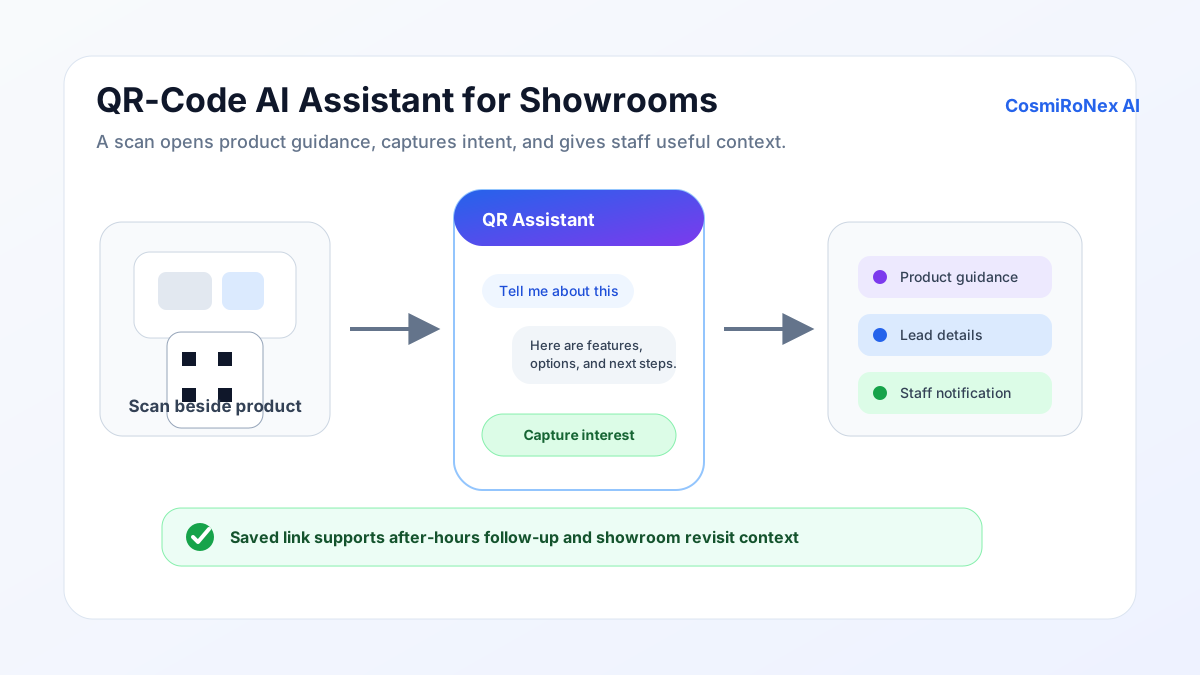
QR assistant versus a QR-to-PDF link
A QR code in a showroom has been used for years — typically to link to a PDF brochure, a product specification sheet, or a pricing list. Scanning gives the customer a static document to read through and decide whether the information they need is in it.
A QR assistant is different in kind. Scanning opens an interactive AI assistant in the customer's mobile browser — one that accepts free-form questions and responds with answers drawn from the store's product and policy content. Instead of reading a fifty-page catalogue, the customer asks: "What is the ground clearance of this SUV?" and receives the specific answer.
The shift is from delivery of information to access to information. A PDF delivers a document. An AI assistant makes the knowledge inside all the store's documents immediately accessible and searchable through conversation.
The scan-to-open journey
The experience begins when a customer scans a QR code with their smartphone camera. No separate QR reader application is needed — all current smartphones open a URL directly from the camera. The scan opens a branded QR assistant interface in the mobile browser within a few seconds.
The interface is designed for a mobile screen held in one hand. The customer sees a welcome message from the store, a prompt to type or tap to ask a question, and — if the QR code is product-specific — a contextual starting point that relates to the product they are standing beside.
From this point the interaction is conversational. The customer asks questions, reads answers, asks follow-up questions, and can request a callback or submit their details at any point. The entire journey from scan to first answer typically takes under thirty seconds.
No application installation required
One of the practical advantages of the QR assistant over dedicated retail apps is that the customer does not need to install anything. The assistant runs entirely in the mobile browser, so there is no app store download, no account registration, and no storage space required on the customer's device.
For showroom businesses that previously offered a downloadable brand app — and found that most visitors declined to install it — this is a meaningful change. The absence of friction at the entry point means customers are more likely to begin an interaction.
The trade-off is that a browser session does not automatically persist across visits. A customer who returns to the showroom weeks later will start a new session. If the customer saved the assistant's URL in their phone browser, they can return to it directly without scanning again.
Where to place QR codes in a showroom
Product-level placement
The most effective use of QR codes is at the product level — one code per product or product group, placed on the display tag, on a stand-alone card beside the item, or on a placard on the display unit itself. A customer standing in front of a specific vehicle or furniture piece can scan and immediately ask questions about that item.
Product-specific codes can be configured to open the assistant with context about the product already loaded, so the customer's first interaction is relevant to what they are looking at rather than starting from a blank screen.
Entrance and waiting-area placement
A QR code at the showroom entrance or in the customer waiting area gives visitors a way to begin their exploration before they have spoken to anyone. "What models do you have under ₹15 lakhs?" or "Do you have any electric vehicles available for a test drive?" are natural opening questions that the assistant can answer while the customer waits.
Brochures and follow-up links
Printed brochures given to customers at the showroom or sent in follow-up communications can include a QR code that opens the AI assistant. This extends the customer's access to product information beyond their visit, particularly useful for high-consideration purchases where the decision involves multiple family members or a longer evaluation period.
Product discovery and comparison in the showroom
Once the assistant is open, a customer can ask about any product in the store's knowledge base — not only the one they scanned. "How does this compare to the model in the next row?" or "Is there a variant with a sunroof?" are questions that naturally arise from standing in a showroom, and the assistant can answer them from the uploaded catalogue.
For high-involvement purchases like automobiles, customers typically have specific requirements: fuel type, seating capacity, boot space, towing capacity, or the availability of a particular safety feature. The AI assistant can filter the catalogue against these requirements and present the options that match — without the customer needing to read every specification sheet on the floor.
Comparison questions are common: "What is the difference between the petrol and the diesel variant of this model in terms of running cost?" The assistant answers from the information it has; for specifications not covered in the uploaded content, it will not be able to provide an accurate figure. Customers should confirm critical details with the sales team.
English and Hindi text and read-aloud
In showrooms that serve customers who speak different languages, the QR assistant supports text conversations in English and Hindi. A customer who is more comfortable in Hindi can ask questions and receive answers in Hindi. Other Indian languages are not currently supported.
Where enabled, read-aloud means that answers can be spoken aloud through the customer's phone speaker, which is particularly helpful when the customer is walking through the showroom and prefers not to read from the screen while moving.
Advanced voice-to-voice conversation is currently an English-language experience. English and Hindi text chat and read-aloud are separate capabilities; voice and read-aloud availability depends on the enabled voice mode and browser.
Lead capture and staff notification
When a customer has used the assistant to explore products and has a specific interest — a model they want to test drive, a configuration they want to price, or an availability question that only a staff member can confirm — the assistant can invite them to submit their contact details.
The customer provides their name and preferred contact method voluntarily. The store receives a lead record that includes the products the customer asked about and the context of their enquiry, which gives the follow-up team a starting point for the conversation rather than a cold call.
Staff notification for in-showroom leads can be configured so that a team member is alerted when a customer submits their details while on the showroom floor. The notification mechanism depends on the store's workflow configuration; the AI assistant itself does not independently dispatch a staff member.
The AI does not guarantee that a follow-up will happen or within any particular timeframe. That is the responsibility of the store's follow-up process. A lead notification that is not acted on quickly is a missed opportunity regardless of how good the initial AI interaction was.
Saved-link and after-hours access
A customer who scans a QR code in the showroom can save the assistant's URL to their phone browser or share it with a family member who was not present during the visit. This means the AI assistant can continue to answer questions about the products the customer was considering, at any time and from any location, as long as the session link remains valid.
This after-hours access is one of the practical differences between a QR assistant and a human salesperson. The store does not need to be open for the customer to continue their research. A customer who visited a showroom on a Saturday afternoon, saved the link, and wants to discuss the decision with their spouse on Sunday evening can do so without waiting for Monday.
Limitations
- A smartphone or compatible device is required. The QR assistant opens in a mobile browser. Customers without a compatible device cannot access it through the QR code; for these customers, the kiosk or a staff member is the appropriate alternative.
- No live inventory. The assistant answers from uploaded product content. Whether a specific unit is in stock at the showroom on a given day requires confirmation from the store team.
- No guaranteed price. Prices in the knowledge base reflect the uploaded catalogue. Negotiated pricing, exchange bonuses, and current promotional offers are not confirmed by the AI and should be discussed with a salesperson.
- No automatic booking confirmation. Expressing interest in a test drive or delivery slot through the assistant does not constitute a confirmed booking. A staff member must confirm availability and complete any booking or reservation.
- Physical availability remains subject to retailer confirmation. A customer who saved the link and returns later should reconfirm whether the specific product they enquired about is still available.
QR Assistant product demonstration
Related articles
Ready to explore how CosmiRoNex AI works for your retail business?
Explore the QR Assistant