
How an AI Website Widget Helps E-commerce Customers Choose the Right Product
Learn how an AI website widget guides e-commerce visitors from product discovery and comparison to confident enquiries and buying decisions.
Why shoppers browse without buying
Online shoppers visit product pages, scroll through specifications, open comparison tabs, and leave — without buying and without making contact. This is not always a sign of low intent. Many visitors are genuinely interested but cannot find specific answers to questions that matter to them personally.
"Will this sofa fit through a standard doorway?" "Does this laptop come with a one-year warranty or two?" "Is this mattress suitable for someone with back pain?" These questions are real and specific; a static product page rarely answers all of them. The gap between what the customer wants to know and what the page provides is where purchase decisions stall.
For e-commerce and D2C brands with large catalogues, the problem is compounded by range depth. A visitor facing fifty product variants with overlapping specifications has no guided way to narrow their options. They either research elsewhere or abandon the site.
From passive browsing to guided discovery
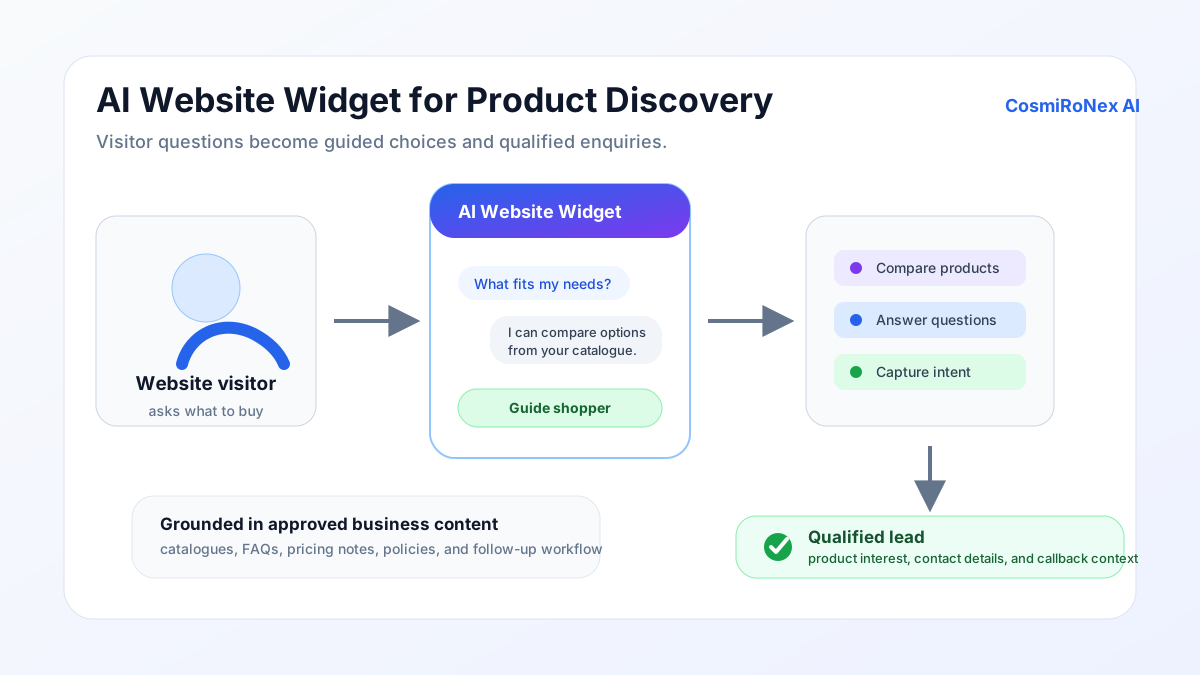
A website AI widget changes the dynamic by giving visitors a way to describe what they need in plain language. Instead of reading every product description and comparing them independently, the customer can type a question and receive a focused answer drawn from the store's product content.
The distinction between passive and guided is meaningful. Passive browsing is self-directed — the customer decides which pages to visit and which specifications to read. Guided discovery is conversational — the customer states a need and the assistant uses the uploaded catalogue to identify options that match it.
Guided discovery is faster for most customers, particularly those who are unfamiliar with technical specifications, have a specific constraint (budget, size, compatibility), or are comparing categories rather than individual products.
Suitability questions and product recommendations
A large part of pre-purchase uncertainty is suitability: will this product work for my specific situation? The AI widget can handle suitability questions when the product content includes the necessary detail.
If a customer asks "Do you have a washing machine that works on a 15A socket and fits in a space of 55 cm width?", the assistant can search the uploaded catalogue for products that match those dimensions and electrical requirements — provided this information is documented in the product sheets. If it is not, the assistant will not be able to answer accurately. This is why catalogue quality and completeness directly affect the quality of the customer experience.
Recommendations follow naturally from suitability filtering. Once the assistant has identified products that meet the stated requirements, it can present the options and explain why each one might be suitable. It does not rank options by margin or promotional priority — it works from the information in the catalogue.
Product comparison
Comparison is one of the most common reasons customers spend time on e-commerce sites without converting. They have two or three options in mind and want to understand the practical differences — not just a side-by-side specification table, but an explanation of which option is better for their particular use case.
The AI widget can compare products in this conversational way. A customer who asks "What is the difference between Model A and Model B for a small apartment?" receives an answer that draws on the documented differences between the two — dimensions, power consumption, noise level, or any other attribute covered in the uploaded content.
The comparison reflects what is in the product documentation. If two products share the same warranty terms but the documentation does not say so explicitly, the assistant will not assume they are identical. Completeness of the uploaded information determines the depth of comparison available.
Pre-purchase objections and policy questions
Many purchase decisions are delayed not by uncertainty about the product but by uncertainty about the terms surrounding it. Return windows, warranty coverage, delivery timelines, and exchange policies are common sources of hesitation.
When these policies are documented and uploaded, the AI widget can answer questions about them directly. "What is your return policy for electronics?" "Does the warranty cover accidental damage?" "How long does delivery take to a Tier-2 city?" — if the answers are in the uploaded policy documents, the assistant can provide them.
Accurate policy answers reduce the friction that leads customers to contact support (or simply leave). They also help customers make informed decisions, which tends to reduce post-purchase dissatisfaction when customers know what they agreed to.
Capturing high-intent leads
Not every website visitor will complete a purchase during that session. Some are researching across multiple sites. Some need time to discuss the decision. Some have a question about availability or pricing that only a staff member can confirm.
The AI widget can offer these visitors a way to leave their contact details and describe their requirements. This turns an otherwise anonymous browsing session into a traceable enquiry. The customer submits their information voluntarily; the widget does not capture contact data without the customer's action.
The resulting lead record includes the context of what the customer asked about — which product, what their requirements were, what questions they had. A follow-up call from a staff member who already knows the customer's context is more productive than a cold outreach with no background information.
The widget across the customer journey
The widget is most useful in the middle and late stages of the purchase journey — when a customer has moved beyond awareness and is actively evaluating options. At this stage, specific product questions, comparison needs, and policy clarifications are common, and the cost of unanswered questions (in terms of lost purchase intent) is highest.
Early in the journey, when a customer is still browsing broadly, the widget can assist by surfacing relevant categories from the catalogue. At the final stage — when the customer wants to confirm a specific detail before committing — it can verify a specification or policy in seconds, removing a last-minute reason to hesitate.
Businesses that deploy the widget without a strong knowledge base will see it provide limited value, because the AI can only answer questions that have corresponding answers in the uploaded content. The journey improvement depends on information quality.
Setting up the widget for your catalogue
The practical work of deploying the widget involves uploading product information, category guides, policy documents, and any content that is regularly relevant to customer questions. This does not require a database migration — the platform accepts common document formats.
The most impactful content to upload first is the information customers ask about most often. For most e-commerce stores this includes: product specifications including dimensions and compatibility; warranty and return policy; delivery timelines and conditions; and any content about product care, installation, or maintenance that customers commonly request from support.
After an initial upload, the quality of the experience improves when the store reviews what questions the assistant could not answer well, then adds or improves the relevant documents. The knowledge base is a living resource, not a one-time configuration.
What the widget cannot do
- It cannot connect to live stock. The widget answers from uploaded documents. Whether an item is currently in stock requires a separate integration or a direct check with the store team.
- It cannot complete a checkout. The widget is an information and enquiry tool. Completing a purchase happens through the store's existing checkout process.
- It cannot track an existing order. Order status, dispatch notifications, and delivery tracking require the store's fulfilment systems.
- It cannot guarantee pricing. Prices shown reflect the uploaded catalogue. Final prices, especially during promotions or for bulk orders, should be confirmed with the store.
- Answers depend on uploaded content. If a product is not in the knowledge base, or a policy question has no corresponding document, the widget will not be able to answer it accurately. Quality of output depends on quality of input.
Website Widget product demonstration
Related articles
Ready to explore how CosmiRoNex AI works for your retail business?
Explore the Website AI Widget