
AI Kiosk for Retail Stores: Use Cases, Benefits and Customer Journey
How AI kiosk software transforms in-store customer journeys — from arrival and product exploration to staff handoff — and when a kiosk genuinely adds value.
What is an AI kiosk for retail?
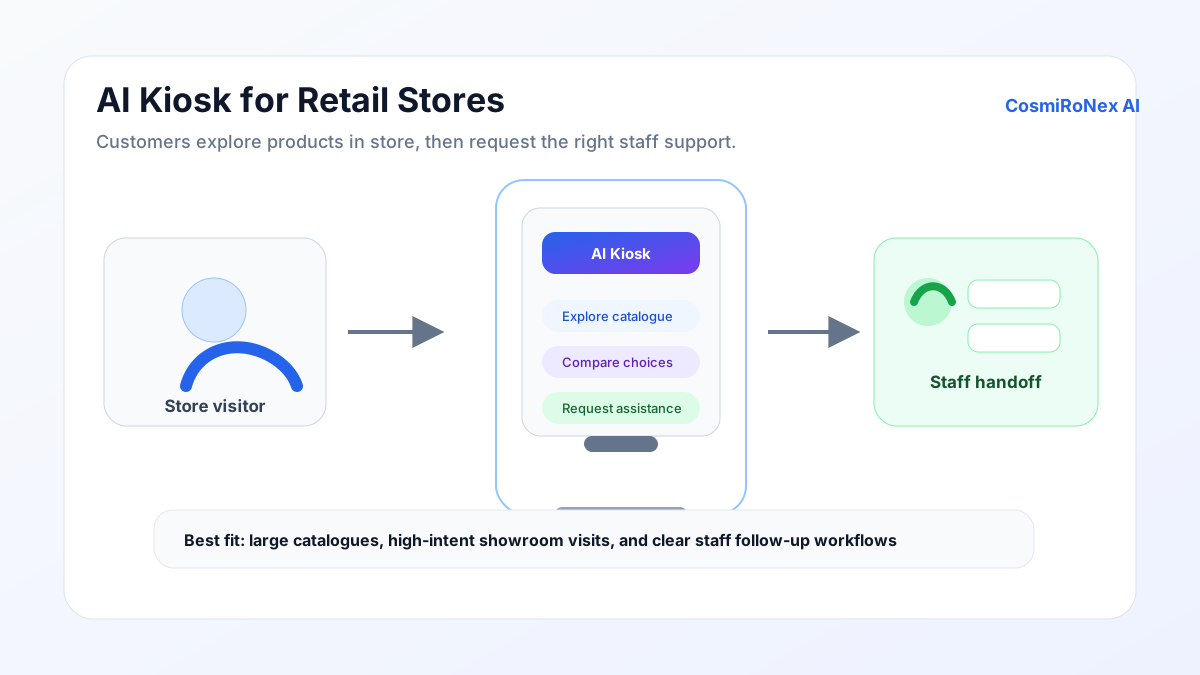
An AI kiosk for retail is a touchscreen display running a document-grounded AI assistant in a fixed, kiosk-ready mode. Customers interact with it using touch — asking questions, exploring products, comparing options — without needing a smartphone, a QR code, or any personal device.
The AI responds from the same knowledge base used across the store's other digital surfaces: uploaded product catalogues, policy documents, and supporting content. The kiosk is the presentation surface; the intelligence behind it is the same assistant that can also run on the website or in a QR experience.
Retail kiosks of this kind are not a new idea, but earlier generations were typically static touch-menu systems — designed for wayfinding or self-checkout rather than open-ended product enquiry. An AI-driven kiosk accepts natural-language questions rather than forcing customers through a fixed menu structure.
Software vs hardware: what CosmiRoNex AI provides
CosmiRoNex AI provides kiosk-ready software: the AI assistant, the touchscreen-optimised interface, the knowledge base, and the configuration tools. The software is designed to run in a browser on any compatible browser-enabled touchscreen display.
Hardware — the physical display unit, stand, casing, and power setup — is not universally supplied as part of the deployment. Businesses typically source display hardware that suits their store environment and budget, then configure the software to run on it. Some deployment partners can assist with hardware sourcing; this is worth discussing during the pilot or onboarding process.
The in-store customer journey with a kiosk
Customer arrival
When a customer enters a showroom or passes a kiosk near a product range, the display presents a clear starting point — a welcome message, the store's branding, and a prompt to ask a question or explore a category. There is no login, no registration, and no app to install. The interaction begins immediately on touch.
Product exploration
The customer can type or use on-screen controls to explore products by category, describe a requirement, or ask about a specific model. "Show me sofas suitable for a small living room" or "What are the features of the Model X refrigerator?" are the kinds of questions the kiosk handles. The AI retrieves answers from the uploaded product content.
Product comparison
A customer who has narrowed their consideration to two or three options can ask the kiosk to compare them — by specifications, by price range, by warranty terms, or by any other attribute covered in the product documentation. Comparisons reflect what the knowledge base contains; the customer should confirm final details with a staff member.
Staff handoff
When a customer is ready to speak to someone — to discuss pricing, see a physical demonstration, or confirm availability — the kiosk can facilitate a handoff. This may take the form of a staff alert, a lead capture with the customer's name and contact preference, or simply a clear on-screen prompt to speak with a nearby team member. The AI does not independently summon staff; the mechanism depends on how the store has configured the handoff workflow.
Lead capture
If the customer wants to receive more information or be contacted later, the kiosk can invite them to leave their name and preferred contact method. The customer submits this voluntarily. The store team receives the enquiry with the context of what the customer was looking at.
Which store types benefit most
A kiosk adds the most value in environments where:
- The product range is wide enough that customers genuinely benefit from guided navigation — furniture showrooms, electronics retailers, automobile showrooms.
- Customers spend meaningful time in-store browsing before making a decision, and staff attention is not always immediately available.
- There is a physical space in the store that is well-trafficked and logistically suitable for a display — near the entrance, in a waiting area, or alongside a flagship product range.
- The store receives customers who may prefer not to approach a staff member immediately and would rather begin their exploration independently.
Jewellery stores, for example, often have customers who want time to explore options before committing to a consultation. A kiosk in a browsing area can answer questions about metal types, purity, occasion suitability, and price ranges before the customer is ready to speak with a staff member.
Hardware and display requirements
The kiosk software runs in a modern browser, so the hardware requirement is a browser-enabled touchscreen display with a stable internet connection. In practice this means any commercial smart display, tablet, or touchscreen monitor running a current version of Chrome, Edge, or an equivalent Chromium-based browser.
Display size depends on the store context. A 32-inch or larger landscape display works well for a standalone kiosk in an open showroom floor. A smaller portrait-format screen might suit a product-adjacent placement or a counter display. The interface adapts to different screen sizes, but usability at very small sizes (under 10 inches) is limited for typical product-enquiry interactions.
Power supply and stand or wall-mount fixings are store-side responsibilities. If the kiosk is in a public area, a secure mounting that prevents casual movement of the device is advisable.
When a kiosk is not the right choice
Not every retail business needs a physical kiosk. A kiosk requires a specific place in the store, hardware investment, and a well-maintained knowledge base to justify its presence. If any of these conditions are not met, the kiosk may not perform as expected.
A small boutique where staff can easily engage every customer who walks in has less need for a self-service enquiry point. A pop-up or temporary retail setup may not be worth the hardware investment for a short run. A store with a very narrow catalogue — fewer than twenty products — may find that a simple printed guide or a QR code on each product serves the same purpose more economically.
For businesses where the primary customer interaction happens online rather than in-store, the Website AI Widget is a more natural starting point. The QR Assistant is a lighter alternative to a kiosk for showroom environments where customers carry smartphones.
English and Hindi text and read-aloud
The kiosk supports text conversations in English and Hindi. A customer can interact in whichever of the two they are most comfortable with, which is particularly relevant in showrooms that serve customers from different linguistic communities within the same city or region.
Where enabled, read-aloud allows product descriptions and answers to be spoken aloud at the kiosk, which is useful for customers who prefer audio output or who are standing at a distance from the screen. The read-aloud feature operates at a comfortable volume appropriate for a retail floor and does not require additional hardware beyond standard display speakers.
Advanced voice-to-voice conversation is currently an English-language experience. English and Hindi text chat and read-aloud are separate capabilities. Other Indian languages are not currently supported.
Limitations
- Operating availability depends on the display. The kiosk is accessible only when and where the physical display is powered on and network-connected. Unlike the website widget or QR experience, it cannot be accessed remotely.
- Hardware is not universally supplied. The kiosk software runs on compatible browser-enabled hardware; sourcing and installing that hardware is typically the store's responsibility.
- It does not replace staff. The kiosk handles informational enquiries. Physical demonstrations, negotiations, and in-person consultations remain staff responsibilities.
- Answers depend on uploaded content. The quality of the kiosk experience is determined by the completeness and accuracy of the uploaded product and policy documents.
- No live inventory. Stock availability and current pricing should be confirmed with a staff member or through the store's live systems.
Deployment checklist
Before going live with a kiosk, it is worth confirming:
- Knowledge base is populated and reviewed. Product content, warranty terms, and policy documents have been uploaded and tested with representative customer questions.
- Hardware is tested. The display loads the kiosk interface reliably in full-screen mode, the touchscreen responds accurately, and audio output works if read-aloud is enabled.
- Network is stable. The AI assistant requires an internet connection. A wired connection is more reliable than Wi-Fi for a fixed kiosk installation.
- Language configuration matches customer base. The languages available at the kiosk reflect the languages commonly spoken by store visitors.
- Lead capture workflow is clear. Staff know how leads from the kiosk appear in the system and who is responsible for following up.
- Staff handoff mechanism is configured. Whether by notification, printed lead summary, or on-screen prompt, the method for a customer to request staff assistance is clear and functional.
- Maintenance ownership is assigned. Someone on the store team knows how to update documents when product or policy information changes.
AI Kiosk product demonstration
Related articles
Ready to explore how CosmiRoNex AI works for your retail business?
Discuss whether an AI kiosk fits your store